Understanding the Maintenance and Calibration of Bionic Prosthetics
Jump to Section
Introduction to Bionic Care
Modern bionic prosthetics are marvels of engineering, blending robotics, software, and human biology. Unlike traditional static prostheses, bionic limbs rely on sensitive electronic components, microprocessors, and motors to replicate natural movement. While this technology offers unprecedented freedom, it also demands a higher level of care.
Proper maintenance and regular calibration are not just about keeping the device looking new; they are critical for user safety and the functional lifespan of the equipment. A poorly maintained limb can lead to "ghost movements," sensor failures, or mechanical breakdowns that could result in injury or expensive repairs. This guide provides the framework for managing your high-tech mobility solution.
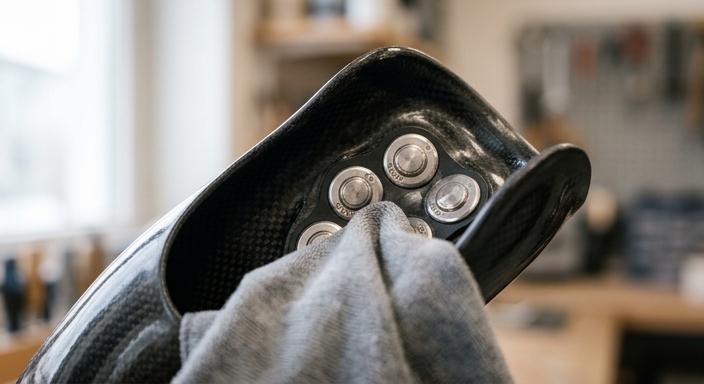
Daily Maintenance Checklist
Consistency is the key to longevity. Implementing a five-minute daily routine can prevent 90% of common bionic failures. Here is what you should check every day:
- Sensor Hygiene: Myoelectric sensors require clear contact with the skin. Wipe the internal electrodes with a 70% isopropyl alcohol wipe to remove skin oils and sweat buildup.
- Visual Inspection: Check the "skin" or cosmetic glove for tears. Even small punctures can allow moisture to seep into the internal electronics.
- Joint Integrity: Gently move the joints (fingers, wrist, or ankle) manually to ensure there is no unusual resistance or clicking sounds.
- Connection Check: Ensure the battery seating is firm and that no lint or debris has entered the charging port.
The Science of Calibration
Calibration is the process of "teaching" the prosthetic's computer how to interpret your muscle signals. Because muscle fatigue, hydration levels, and even temperature can affect the electrical impulses (EMG signals) your body produces, the device needs frequent updates.
Most modern bionics utilize an app-based interface. During calibration, you will be asked to perform "Maximum Voluntary Contractions" (MVC) and "Rest" states. The software sets a threshold: anything above the threshold triggers a movement. If the threshold is too high, the limb feels heavy and unresponsive. If it is too low, the limb may move unintentionally when you relax.
We recommend calibrating in the morning and again after any strenuous physical activity. This ensures the "gain" of the sensors matches your current physiological state.
Maximizing Battery Longevity
Most bionic limbs use Lithium-Ion or Lithium-Polymer batteries. These are efficient but sensitive to how they are charged. To get the most years out of your battery, follow these rules:
Avoid "Deep Discharge." Do not wait until the limb is at 0% to charge it. Ideally, plug it in when it hits 20%. Similarly, try to avoid leaving the device on the charger for days at a time once it has reached 100%, as this can generate heat that degrades the battery cells.
Environmental Protection Strategies
Dust, moisture, and extreme heat are the primary enemies of bionic components. While many devices are "water-resistant," very few are "waterproof."
- Moisture: If you are caught in the rain, power down the device immediately and dry the exterior. Do not use a hairdryer, as excessive heat can melt internal solder.
- Dust and Sand: If you spend time at the beach or in a dusty environment, use a protective sleeve. Fine particulates can enter the gearboxes and act as an abrasive, wearing down the motors.
- Heat: Never leave your prosthetic in a hot car. The high temperatures can cause the battery to swell and the delicate sensors to lose their accuracy.
Common Troubleshooting Steps
If your limb stops responding correctly, follow the "Rule of Three":
- Power Cycle: Turn the device off, wait 30 seconds, and turn it back on. This resets the microprocessor.
- Skin Contact Check: Ensure your residual limb is properly seated. If your skin is too dry, the sensors may not pick up signals; a tiny amount of conductive prosthetic gel can help.
- App Diagnostics: Open the manufacturer's app. Most will have a "Signal Monitor" that shows you in real-time if the sensors are receiving data.
Professional vs. Personal Maintenance
While daily care is your responsibility, mechanical servicing belongs to the experts. Most manufacturers recommend a professional "MOT" or service every 12 to 24 months. During this time, a technician will open the device, lubricate the internal drives, update the firmware, and replace any worn-out gaskets or seals.
Attempting to open the chassis of your bionic limb yourself will almost certainly void the warranty and may compromise the structural integrity of the device. If you hear "metal-on-metal" sounds or feel excessive heat coming from the motor housing, seek professional help immediately.
Frequently Asked Questions
Daily calibration is recommended for most users, especially first thing in the morning when muscle signals might be different from the previous day.
You should never submerge a bionic limb unless it is specifically rated as waterproof. Use a damp, lint-free cloth with mild soap for surface cleaning.
Grinding noises often indicate dust or debris in the joints or a lack of lubrication. Stop use and contact your prosthetist.